
To ensure efficient query performance, indexes are used in SQL Server. They allow the engine to locate and retrieve data quickly as they don’t involve any scanning process. Operations like insert, update, and delete are common in a database. When they are frequently used, they can fragment the indexes. When indexes are fragmented, the server may be required to perform additional tasks like page reads. This slows down query execution.
To resolve this, index maintenance options are used in SQL Server. These are: rebuilding and reorganizing indexes. Each of them has its own pros and cons in terms of resource usage and effectiveness. In this post, we will learn more about these index maintenance techniques and discuss in detail how often they (rebuild or reorganize indexes) should be performed in a SQL Server environment.
What is Index Fragmentation?
Fragmentation occurs due to mismatch between the logical order of index pages and physical order on disk. It can cause inefficient data retrieval, slow queries execution, and increased resource usage. Common types of fragmentation are:
- Internal fragmentation happens when pages contain unused space due to frequent row modifications. It often occurs due to page gaps created by DELETE operations.
- External Fragmentation appears when pages become out of order, usually occurring due to page splits while performing INSERT and UPDATE operations.
Internal and External Index Fragmentation: Causes
- Data pages and the index order are modified by frequent INSERT, UPDATE, or DELETE operations.
- Full pages are split into two, leaving gaps and misalignment.
- If you’ve inserted random values which don’t follow sequential order.
- Large transactional workload (OLTP systems like in Banking systems or e-commerce platforms)
How to Measure Fragmentation in SQL Server?
You can use sys.dm_db_index_physical_stats to check the number of pages and fragmentation percentage in the indexes. This helps you easily choose whether it is to be organized or rebuilt.
SELECT
DB_NAME(ips.database_id) AS DatabaseName,
OBJECT_NAME(ips.object_id) AS TableName,
i.name AS IndexName,
ips.index_type_desc,
ips.avg_fragmentation_in_percent,
ips.page_count
FROM sys.dm_db_index_physical_stats
(
DB_ID(),
OBJECT_ID(‘EmployeeRecords’),
NULL,
NULL,
‘DETAILED’
) AS ips
INNER JOIN sys.indexes AS i
ON ips.object_id = i.object_id
AND ips.index_id = i.index_id
ORDER BY ips.avg_fragmentation_in_percent DESC;
GO
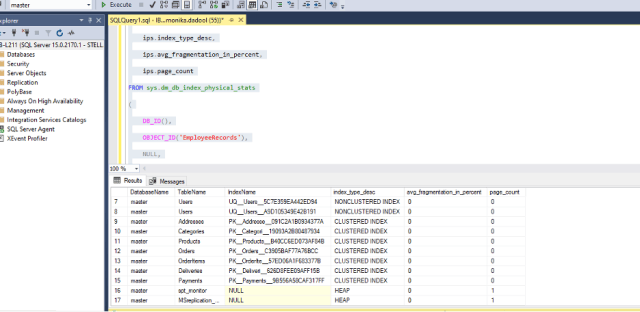
In the output,
-
- check avg_fragmentation_in_percent for percentage
- page_count for the number of pages in indexes
What is Index Reorganize in SQL Server?
Index reorganize is an online defragmentation process that works gradually to improve index structure without dropping or recreating it. This lightweight operation runs online, thus uses fewer resources. It does not block queries, making it suitable for production environments where uptime is critical.
What is Index Rebuild in SQL Server?
Index rebuild drops and recreates the index from scratch. It can remove both internal and external fragmentation. It also updates index statistics automatically, which helps to make better decisions. However, this process requires more resources unlike re-organize. Also, it may block queries, thus it is often scheduled when the fragmentation levels are high or during maintenance window.
Index Rebuild vs Index Reorganize – A Comparison
| Aspect | Reorganize | Rebuild |
| Fragmentation | Over 30% | 10–30% |
| Operation Type | Always Online
|
Offline (default) or Online with ONLINE=ON |
| Database Table Locking | No lock (reads/writes continue) | Locks table unless ONLINE=ON |
| Statistics Update | No. Need to run UPDATE STATISTICS manually | Yes, full scan automatically |
| T-SQL Command | ALTER INDEX … REORGANIZE | ALTER INDEX … REBUILD |
| Cons | Only defragment at leaf level; no stats update; less effective on heavy fragmentation | High CPU/I/O/log usage; may lock tables; requires extra space |
| Pros | Lightweight; online; minimal log growth | Eliminates fragmentation fully; compacts pages; updates stats |
| Edition requirement | All SQL Server editions supported | Online needs Enterprise/Developer |
When should you Reorganize Indexes?
You should use reorganize indexes,
- When these is moderate levels of fragmentation i.e. 5–30%.
- If you want a quick operation.
- If your system has less resource available.
- If you are using OLTP system which requires continuous activity.
- In high availability systems with minimal disruption.
When should you Rebuild Indexes?
Index rebuild is the preferred choice:
- When fragmentation exceeds 30%.
- When dealing with large, heavily fragmented indexes.
- When you need to remove fragmentation completely.
- If you want to update statistics automatically, improving query performance.
- For severe performance degradation scenarios where efficiency must be restored.
How often should Index Maintenance be performed in SQL Server?
There is no fixed schedule for Index maintenance in SQL Server. It should be performed based on fragmentation levels and workload. A common guideline is to reorganize indexes when fragmentation is between 5–30% and rebuild them when fragmentation exceeds 30%. However, the actual frequency varies with the following factors:
- System is OLTP (Frequent inserts/updates/deletes require more maintenance.)
- Index usage patterns
- Reporting
- Resource available or mixed workload
- Maintenance windows
Suggested Index Maintenance Intervals
| Interval | Workload Type |
| Daily | High-transaction OLTP databases, e-commerce, or financial systems with constant inserts/updates.
|
| Weekly | Medium-sized business applications with moderate updates/inserts activity |
| Monthly | Reporting warehouse environments where fragmentation builds slowly |
How to Automate SQL Server Maintenance with SQL Server Agent?
Automating SQL Server maintenance – rebuilding and reorganizing indexes – ensures they remain efficient without manual effort. SQL Server Agent runs these tasks automatically at set intervals, with results logged for review. To automate the rebuild and reorganize indexes process in SQL Server, follow these steps:
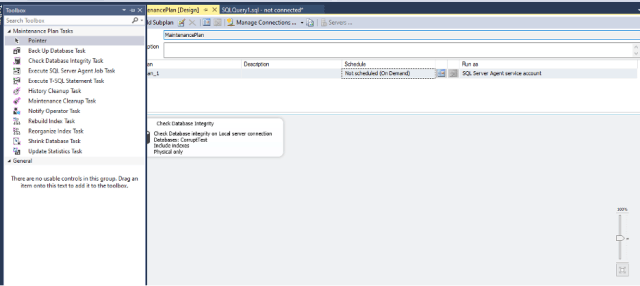
- In SSMS, connect to the Database Engine.
- Go to Management and click Maintenance Plans.
- Click New Maintenance Plan.
- Add Reorganize Index Task or Rebuild Index Task.
- Configure the selected tasks, like select databases and tables where you want maintenance to apply, and set conditions. And specify fill factors.
- Next, schedule with SQL Server Agent and define the schedule to run automatically.
Best Practices for SQL Server Index Maintenance
Here are some practices you should know and follow while performing the Rebuild or Reorganize process:
- Avoid rebuilding all indexes unnecessarily; apply fragmentation thresholds wisely.
- Focus on large indexes as rebuilding or reorganizing small indexes with low page counts add little value.
- Use SQL Server Maintenance Plans or Agent jobs to automate these tasks for consistency.
- Monitor performance continuously, like tracking query speed, reviewing execution plans, etc.
- Update statistics regularly to keep them accurate.
- Use AUTO_UPDATE_STATISTICS for ongoing optimization.
How Stellar Repair for MS SQL helps in Database Maintenance Scenarios?
Regular index maintenance in SQL Server (rebuild or reorganize indexes) helps manage fragmentation and ensures smooth performance. However, even with proper maintenance, you can still face issues such as MDF/NDF file corruption or index corruption. This is where Stellar Repair for MS SQL comes into picture. This SQL database repair tool can help you repair corrupt databases, recover inaccessible objects, and restore tables, indexes, triggers, and keys, ensuring that downtime is minimized after incident.
Even with regular monitoring and proper index maintenance, certain database issues may still require a different approach. For instance, when database corruption makes a database or specific objects inaccessible, Online SQL Database Repair can be considered to help restore access and recover affected database components. Unlike routine index maintenance, which primarily focuses on managing fragmentation and maintaining query performance, database repair addresses issues that may affect the integrity and accessibility of the database itself.
Conclusion
In this post, we have discussed “how often should you use Index maintenance”. As the process of reorganizing indexes is light, it can be scheduled daily, when fragmentation is moderate (5–30%). However, the process to rebuild indexes when fragmentation gets above 30% requires more resources, and is best scheduled weekly or monthly during low-usage periods.
If indexes or databases get corrupted because of crashes or damaged files, you can use Stellar Repair for MS SQL. This tool can fix database (MDF/NDF file) corruption and recover all objects, thus help to bring the database back online.


