WordPress has finally released the long-awaited 3.1 version named “Reinhardt” in honour of the jazz legend Django Reinhardt. Overall, WordPress 3.1., which has been described as more of a content management system (CMS) than ever before, comes with a redesign that would make your workflow faster and easier to link to your existing pages and posts. The new workflow is encapsulated in an Admin bar (shown in the image below), that sits right on top of your Web page. The Admin bar contains links or menu-items that will allow Webmasters to edit their profile, go to dashboard, and log out from the front-end. Other menu-items include Add New (Posts and Pages), Comments, Appearance (Widgets and Menus), Shortlink and a search bar.
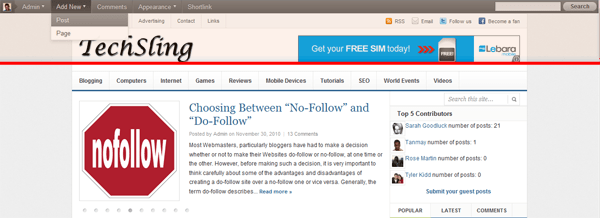
Direct Front-End Access
In addition, new features include, a streamlined writing interface that hides rarely used panels by default so as to create a simpler interface (you can visit Screen Options to restore panels) and a refreshed blue admin scheme that can be chosen under the personal options. Developers will also benefit from a new Post Formats support that will make it easy for themes to create portable tumblelogs with different styling for different post types.
Better CMS Functionality
Furthermore, WP 3.1 offers new and more flexible CMS capabilities such as archiving pages for custom content types, a new Network Admin, improved import and export system and the ability to perform advanced taxonomy and custom fields queries. All in all, this is a vast improvement on previous versions which have also been excellent and I must congratulate the development team who have implemented a lot of features users’ have asked for.
Click here to download WP3.1-(the latest WordPress Version) or alternatively, update from within your dashboard.
Talking Point
What are your impressions of the new WordPress Version 3.1?



Oh, and I wondered what happened to my writing panel:)
Yes, I’ve updated and noticed right away a bar on the top of a blog. Might come handy.
Most importantly for me is that updating went smooth, no bugs so far!
Great. As always it is important to check its compatibility with your theme before upgrading. Meanwhile, those who do not fancy the Admin bar on the top, can disable it from their User profile setting.
Word Press 3.1 (CMS) Upgrade is really amazing, i’m satisfied with its performance on my webpage……….. useful post on wp upgrade, You are a timesaver! Special thanks for the admin bar 🙂
Amazing! a new information about the word Press.
I known best CMS: LitePUblisher is free open source CMS.
I’m afraid many will disagree with you on that one.
Yes, but only for one reason: they did not test and do not want to test LitePublisher
I am just hearing about the new release of WordPress 3.1, I am going to install it on a new blog I want to setup and see all this features you just mention.
Everything else is fine, but WP 3.1 has disabled sending emails when comments are posted to my site. It only sends comment moderation emails now. But strangely both options are still present under Settings > Discussion panel!
I am a person who likes to have an email record of every comment posted. And I prefer to store the email that is sent after the comment is posted, rather than the comment moderation email.
So I find this new idea very stupid and uncalled for. For starters, there’s a fundamental flaw in it. Comment moderation emails only come for comments that aren’t marked as spam. But often, genuine comments end up in the spam folder (specially if you’re using Akismet). And in this case, moderation emails don’t come even after you mark them as “Not spam”.
Can someone please tell me how to restore the old functionality, or point me to a good simple plugin that can do this for me on WP 3.1?
Thanks
Vijay Padiyar
You might have to revert back to the previous version that worked or inform the WP developers of this problem.
Well, I managed to fix it myself. You can read about it here: http://wordpress.org/support/topic/upgrade-to-31-breaks-comment-notification-via-email
wordpress has always proven how great it is. period.
It is very informative post and it really enhanced my knowledge regarding word press. Thanks for sharing such an information for new ones.