

Many of us often find ourselves in a scenario where we need to convert a JPG file into a word document. Most of us just type the entire content of the image into a word file. This takes up a lot of time and effort. I am here to show you how you can convert JPG files directly into editable Word documents, thereby saving you loads of time and effort.

Generally, one has to download a software that can do your conversion for you. The technique that is used by the software is called OCR (Optical Character Recognition). There are numerous OCR tools available online and many more OCR software available to download. Here I will discuss about one such software that you can use.
JPG to Word Converter
Now, there are lots and lots of software that can do JPG to word conversion. To save you the trouble of choosing from a lot of software, we have listed one here that should be adequate for all purposes.
JPG to Word Converter is an easy to use converter that will help you convert your files. The converter supports over 40 languages, so it will prove adequate for all purposes.
Follow the steps below to convert your JPG files to Word files.
- Download the JPG to Word Converter from http://jpeg-to-word-converter.en.softonic.com
- You can also download the software from http://products.softsolutionslimited.com/img2ocr/category/jpg_to_word.htm
- Once the software is downloaded, open it and install it by following the on-screen instructions.
- Once installation is complete, open the software. You should see a screen like this

- On the left side, you can select if you want to open a saved JPG file or scan a document directly from your scanner.

- Once you upload the image, you now have to select the output file format. Since we are dealing with Word files, check Word (Doc)
There is also an option to “Select All” which means that the output file will be saved in all available formats.
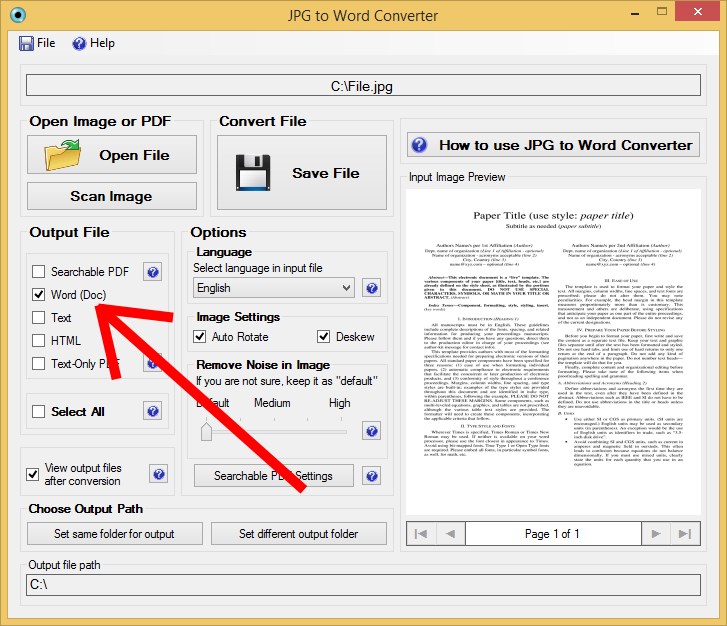
- Select the language of the input image file from the drop down menu under Language
- Check “Auto Rotate” and “Auto Skew” which will correct the rotation and skew of the input file.
- Now you just have to click on the Save Button.
TADA! Your output word file is ready. The Word document can be edited as desired.
If you need any more help on using the software, you can watch the video tutorial:

Some helpful tips
- Always provide a good quality image for converting for better accuracy.
- You can also add watermarks to your converted file and also protect it with a password using the software’s security features.
There you go! You can now easily convert any JPG file into a Word file (or any other file for that matter).